Game Overview
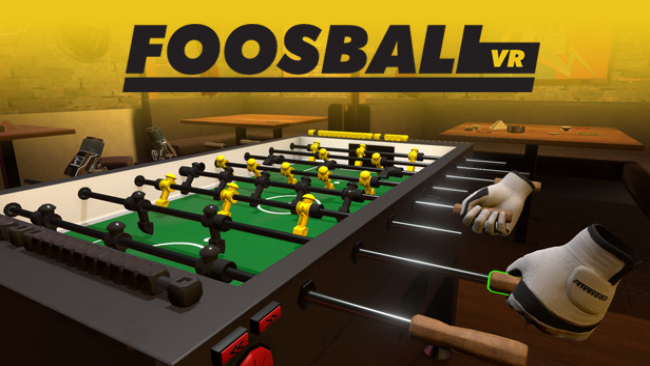
Foosball VR is a table football simulator focused on the same sensation you get from playing it in the real world. The player starts in a pub interior with a foosball table that stands in the middle. Access to the in-game menu is provided by pressing a physical button placed on the side of the table. Two flat screen TVs located near the ceiling show the current score of a match.
- Standard – the most realistic foosball simulation you can get for VR,
- Bomberman – you play with a ball that is, in fact, a bomb that explodes in short time intervals. Be sure to send it towards your opponent shortly before it goes off – he might lose some of the players for a couple of seconds,
- Wiggle-Wiggle – have you ever wondered how it would be to play the game with rubber-like elastic footballers? Well, now you have a chance to try it out,
- Ice Level – the whole foosball field gets frosted and instead of playing with a ball we play with an ice cube!
- Pong – are you a fan of the 8-bit microcomputers or early arcade machines? After playing this game mode we are sure you will be,
- Fast and Furious – good for reflex training. The ball can go faster or slower depending on the game pace but it will never do a full stop.
- Size Doesn’t Matter – depending on the game score – the ball will grow or shrink when being controlled by a particular player.
- Goalkeeper Wars – this game mode exists in the real world too. Two goalkeepers defend each other shots.
- Magnetic – you play a metal ball which is attracted by magnets placed behind the goalkeepers.
- Portals – the ball can teleport from the one side of the table to the other.
Installation Instructions
- Click the green button below to be redirected to UploadHaven.
- Wait 15 seconds, then hit “Free Download.” (Free downloads may be slower — upgrade to UploadHaven Pro for faster speeds.)
- Once downloaded, right-click the .zip file and choose “Extract to Foosball VR.” (You’ll need 7-Zip for this.)
- Open the extracted folder and run the game as administrator.
- Enjoy! 🎮 If you see missing DLL errors, check the _Redist folder inside and install what’s needed.
Added
Status
Online
Not seeing the latest version? Request an update
System Requirements
- Requires a 64-bit processor and operating system
- OS *: Windows 7 or newer
- Processor: Intel i5-4590 equivalent or greater
- Memory: 8 GB RAM
- Graphics: NVIDIA GTX 970 / AMD Radeon R9 290 or greater
- Storage: 2 GB available space
- VR Support: SteamVR or Oculus PC. Standing Only